The Entity Definition
Every configuration record links to an Entity Definition: the list of fields the analysis is allowed to use.
A rule can only reference a field that is already in the Entity Definition. Try to save a rule against a field that isn't, and you get an error. This is the most common source of frustration when authoring rules, so it's worth understanding before you start.
Why it exists
By default the analysis works with a small set of built-in name, address, phone, and email fields. Those cover the default rules and most typical CRM systems.
The moment you want to match, rank, or score on anything else, whether another built-in field or one of your own custom fields, you register it in the Entity Definition first, then reference it in a rule.
Adding a field on the entity definition
Open the configuration record, follow the entity link to its Entity Definition, and add the field by its schema name, not its display label.
Then return to your matching, ranking, or precision rules and reference it.
Adding a field from a related parent record
Rules can reference fields on N:1 (parent) records, such as a contact's parent account.
For a related field, fill out these fields on its Field Definition record:
- Schemaname: the field's schema name as it exists on the related entity (not on the main entity being analyzed). For example, enter
name, to pull in the parent account's Account Name into a Contact's Entity Definition. - Field Format: the related field's real format, e.g.
String. - Fuzzy Match Type: only when Field Format is
String, e.g.Company Name. Note not allStringtype fields will have a fuzzy match type. - Answer "Is this above Schemaname field from an N:1 related entity?" by filling in all three:
- Related Entity Name: the parent entity's logical name, e.g.
account. - Related Entity Primary Key Field Name: that entity's primary key, e.g.
accountid. - Related Entity Lookup Field Name: the schema name of the lookup field on the entity under analysis that points to the parent record, e.g.
parentcustomerid.
- Related Entity Name: the parent entity's logical name, e.g.
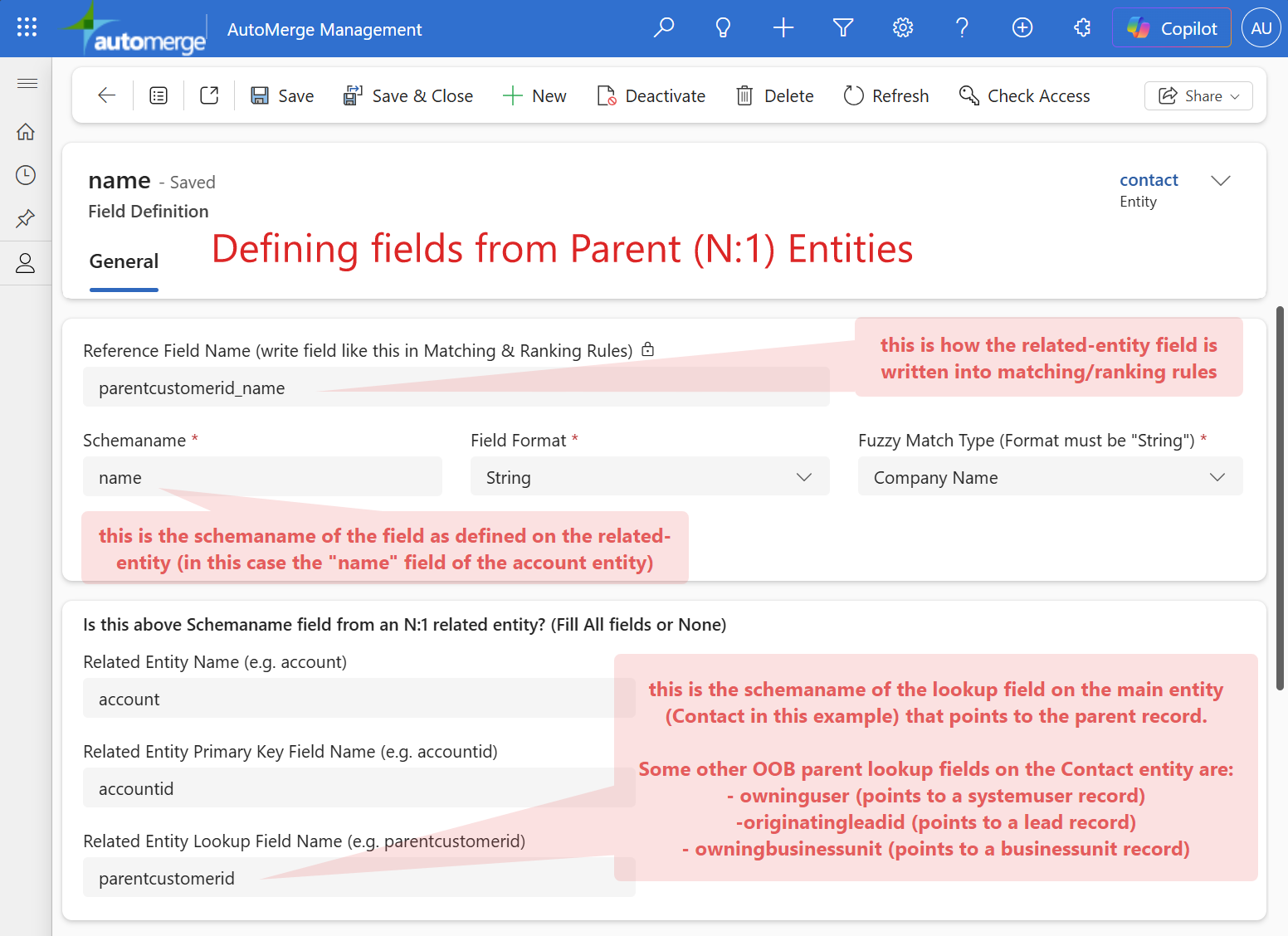
Once saved, the Reference Field Name shown at the top of the record (e.g. parentcustomerid_name) is how you write this field into your matching and ranking rules.
Other common out-of-the-box parent lookup fields on Contact you can use the same way: owninguser (points to a systemuser record), originatingleadid (points to a lead record), and owningbusinessunit (points to a businessunit record).
More examples
| On this entity | Field you want | Schemaname | Field Format | Fuzzy Match Type | Related Entity Name | Related Entity Primary Key | Related Entity Lookup Field Name | Reference Field Name* |
|---|---|---|---|---|---|---|---|---|
| Lead | Owning business unit's name | name | String | (none) | businessunit | businessunitid | owningbusinessunit | owningbusinessunit_name |
| Account | Primary contact's email address | emailaddress1 | String | Email Address | contact | contactid | primarycontactid | primarycontactid_emailaddress1 |
| Contact | Parent account's industry | industrycode | Number | (none) | account | accountid | parentcustomerid | parentcustomerid_industrycode |
| Contact | Parent account's phone number | telephone1 | String | Phone Number | account | accountid | parentcustomerid | parentcustomerid_telephone1 |
| Contact | Owning user's enabled status | isdisabled | Number | (none) | systemuser | systemuserid | owninguser | owninguser_isdisabled |
| Contact | Parent account's website URL | websiteurl | String | (none) | account | accountid | parentcustomerid | parentcustomerid_websiteurl |
* Auto-generated: the Related Entity Lookup Field Name and the Schemaname, joined with an underscore. This is how this field is referenced in matching and ranking rules.
A shortcut worth knowing
A field needed only for your FetchXML filter does not need to be in the Entity Definition at all.
If you're using a field purely to select which records get analyzed, and not for matching, ranking, or precision, you can reference it in the FetchXML filter and skip the Entity Definition entirely.
That saves real time when your filter references several fields you have no intention of matching on.
Errors you might recognize
| Error | Cause |
|---|---|
| Error saving a rule that references a valid field | The field isn't in the Entity Definition yet |
'Contact' Entity Doesn't Contain Attribute with Name = X when trying to AutoMerge a duplicate set. | A field in the preservation list was removed from the entity. See common errors |
| Analysis returns fewer records than expected | Usually the FetchXML filter or the CRM-connection appuser's security roles |
Related
- Configurations overview: the five parts of a configuration
- Matching rules: where field references are used most
- FetchXML filtering: the one place a field can skip registration